What Happens to Your Control4 or Savant System If the Manufacturer Discontinues Support? (Tampa Bay Homeowner’s Guide)
When Control4 or Savant stops supporting part of your system, the equipment usually keeps working locally but gradually loses app access, remote connectivity, streaming services and integrations with newer devices. In most homes the fix is replacing the central controller and migrating what still works, not tearing out the entire system, as long as you act before failures start to cascade.
The first sign is rarely dramatic. A homeowner in South Tampa upgrades to a new iPhone, opens the Control4 or Savant app, and finds it won’t connect. The wall keypads still turn on the lights, but Spotify has vanished from the audio menu and the cameras won’t load. That pattern is what discontinued support usually looks like. The core of the system still runs, but the parts that depend on software updates, cloud services and outside manufacturers slowly fall away.
The good news for Tampa Bay homeowners is that an unsupported system is rarely a total loss. The wiring, lighting loads, speakers and shades are often worth keeping, even when the controller behind them has reached the end of its life. The real risk is waiting too long, because a controller with failing memory can go from sluggish to completely unbootable after a single summer power outage.
What “Discontinued Support” Actually Means for a Control4 or Savant Home
Manufacturers rarely shut off an entire platform at once. What they discontinue is specific hardware and software, usually controllers, touchscreens and app versions that have aged past what current software can run on. A home might have a controller installed ten years ago that is no longer eligible for new operating system versions. The rest of the system around it may be perfectly capable. In the industry, this is called end-of-life hardware deprecation, and it usually affects the processor at the center of the system first.
Control4 homes feel this most clearly during operating system transitions. Some older controllers can’t move from earlier versions like OS 2 to the platforms that followed, such as OS 3 and Control4 X4. Once a controller is locked out of newer software, it also stops receiving updated drivers for the TVs, streaming services and devices it controls. Remote access through Control4’s 4Sight subscription depends on the same modern software. That is why owners of older systems often find the app fails the moment they leave the house.
Savant systems follow a similar arc. Early Savant hosts and older app builds can age out as Apple and Android update their mobile operating systems, and newer phones may refuse to run the legacy app at all. The host can keep running lighting scenes and local routines for years in that state. Everything that relies on the app, cloud access or modern integrations becomes unreliable. For the homeowner, the result is a system that feels half alive.
The Warning Signs Tampa Bay Homeowners Notice First
The earliest symptom is almost always remote access. The mobile app works fine on the home Wi-Fi but loses connection the moment the phone switches to cellular data. For Tampa Bay homeowners who travel often or manage a second home, this is usually when the problem becomes impossible to ignore. Closely behind it is lag. Keypads and touchscreens start taking five to ten seconds to respond to a lighting press, and families begin wondering whether the button registered at all.
Entertainment is the next thing to go. Streaming services like Spotify and Apple Music disappear from audio menus or stop playing without warning. That happens because those companies update their systems constantly, and an unsupported controller can no longer receive the matching drivers. Multi-room audio setups are often the first zones to fail for this reason. A house built around music on the lanai and in the kitchen can lose that feature one zone at a time.
Integrations with other equipment start breaking too. Weather widgets, IP cameras and thermostat controls may show a permanent loading icon, and intercom or push notification alerts stop reaching phones. In multi-user households, the confusion multiplies. One family member upgrades a phone and loses control, while others on older devices can still use the app for a while. When a homeowner hears from the original dealer that the hardware can no longer be serviced, the system has usually been declining for a year or more.
What Is Actually Failing Behind the Scenes
Several separate failures tend to arrive together, which is why aging systems seem to fall apart all at once. The first is security certificates. Modern cloud services require current encryption standards, known as SSL and TLS protocols, and older controllers may lack the processing power or firmware to support them. When a legacy controller’s certificates expire and can’t be renewed, it loses its secure connection to remote access servers and outside services. The controller itself hasn’t broken. The rest of the internet has simply moved past it.
The second failure is abandoned drivers. TV makers, cable providers, soundbar brands and streaming platforms regularly change the way their products are controlled over the network. A current controller receives updated drivers to keep up, but a discontinued one stays frozen. Zones then lose audio or video switching one by one as each manufacturer pushes an update. The third failure is the mobile app itself, which eventually drops support for older controller software as iOS and Android move forward.
The fourth failure is physical, and it is the most dangerous. Central controllers store their operating system and project programming on flash memory, and that memory wears out over years of continuous operation. A controller with degraded memory can corrupt its own files during a reboot. That can leave it stuck in a loop that disables even basic lighting scenes. In Tampa Bay, where summer storms knock out power regularly, a failing controller often gets that fatal reboot sooner than it would elsewhere.
The Misconception: An Unsupported System Has to Be Torn Out
Many homeowners assume that once a dealer calls their system end-of-life, the only option is to rip everything out and start over. In most homes, that isn’t true. The most valuable parts of an automation system are often the infrastructure behind the walls. That includes the Ethernet cabling, lighting circuits, speaker wire, shade motors and display locations. A proper assessment separates what has genuinely aged out from what can carry forward to a modern platform. The controller, older touchscreens and some proprietary keypads usually need replacing, but much of the investment can often be preserved.
The part that can’t wait is the timing. A proactive core upgrade replaces the central controller and moves existing lighting, switches and shades onto current software while everything still runs. If the system is left until it fails, older keypads, audio switchers and touchscreens may be incompatible with whatever replaces the dead controller. Homeowners then face swapping most of the hardware at once. In the worst cases, a home loses control of its lighting entirely and needs emergency rewiring.
Some common DIY moves speed up that decline. Repeatedly unplugging a controller with failing memory can push it into a permanent boot loop. A hard factory reset wipes the project programming file, which can only be rebuilt by a certified dealer with proprietary software. Even upgrading the home router can break the fixed IP address scheme an older controller depends on, taking the whole house offline in an afternoon.
Why Tampa Bay Homes Age These Systems Faster
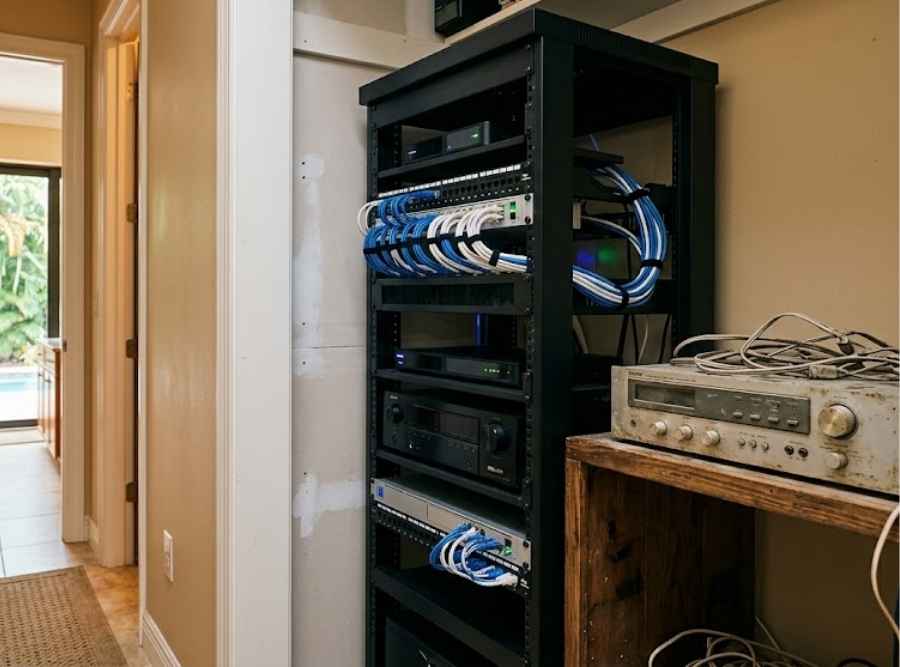
Tampa Bay’s climate is hard on equipment that runs around the clock. Automation controllers and AV racks are often installed in closets, under stairs or in cabinetry with little ventilation. Heat builds there year-round, and summer highs above 90°F from May through October add to it. Constant heat and humidity break down the capacitors in power supplies, and aging controllers are the most vulnerable. A rack that looked tidy on installation day may have been cooking its electronics for years.
The region’s storm season adds electrical stress. Afternoon lightning from June through September and the grid brownouts that come with it create sudden voltage drops, which can corrupt aging flash memory in a single event. In homes closer to Hillsborough Bay and Old Tampa Bay, salt fog also oxidizes connectors on older equipment that lacks modern sealed ports. Seasonal residents face a separate risk. Systems left idle or powered down for months on outdated networks often fail to reconnect when the owners return in the fall.
Housing age matters too. Many South Tampa and Seminole Heights homes received automation as part of renovations more than a decade ago, some using proprietary wiring rather than standard Cat6 Ethernet. Those installations can create real obstacles when the legacy controller comes out. By contrast, many 2000s-era homes in New Tampa communities like Tampa Palms and Hunter’s Green were wired with standard cabling. That can make a migration far simpler. Knowing which situation you’re in is one of the first things a good assessment should establish.
Upgrading Early or Waiting: How the Cost Changes
| Timing | What the work usually involves | Relative cost |
|---|---|---|
| Proactive core upgrade | Replacing the central controller and migrating working lighting, switches and shades | Moderate |
| After a cascading failure | Replacing controllers plus incompatible keypads, touchscreens and audio switchers | Much higher |
| Worst case | Emergency tear-out and rewiring of lighting and control infrastructure | Highest |
The pattern in the table shows up in the field again and again. Systems installed seven to twelve years ago are the ones most likely to hit hard software limits, especially early Control4 HC-series controllers and early Savant hosts. If your system is in that age range and already showing lag or app problems, an assessment now costs far less than a rescue later. Waiting rarely makes the upgrade cheaper, because each new failure removes one more component that could have been saved.
The Paradise Systems Difference
Most problems with aging automation systems begin with systems that were installed and never revisited. Nobody watched firmware eligibility, nobody planned a path forward, and the homeowner only learned the hardware had aged out when something stopped working. Paradise Systems approaches legacy systems as a planning problem rather than an emergency. We document what the home has, identify which components have reached end-of-life, and lay out what can stay and what should change.
As an authorized Savant dealer, we can upgrade aging Savant hosts and move existing programming, lighting and shades onto current Savant hardware. For Control4 homeowners whose original dealer is no longer available, Control4 maintains its own network of authorized dealers who can access the project file. When a Control4 system has aged past a sensible repair, we can evaluate which wiring, lighting, shades, speakers and displays can carry forward to a new Savant platform. That way the homeowner starts from the infrastructure they already paid for, not from bare walls.
We also look at the conditions that shortened the old system’s life in the first place. That often means rack ventilation, surge protection and a network built to support current equipment. A new controller placed in the same hot, unprotected closet will face the same problems in a few years. Fixing the environment along with the hardware is what makes an upgrade last for homeowners across Tampa, St. Petersburg, Clearwater and the rest of Tampa Bay.
Frequently Asked Questions About Discontinued Control4 and Savant Systems
How long do Control4 and Savant controllers last?
Most controllers remain fully supported for several years, but systems installed seven to twelve years ago are the most likely to hit software limits. The hardware itself may keep powering on well past that point. What ages out first is its ability to run current software, connect to cloud services and work with newer phones. In hot Tampa Bay equipment closets, power supplies and flash memory can also wear out sooner than they would in a cooler, well-ventilated space.
Why did my Control4 or Savant app stop working after I got a new phone?
Newer versions of iOS and Android can drop support for older app builds, and the current app may no longer be compatible with your older controller. The controller is usually still running, which is why your wall keypads keep working. The issue is the communication gap between the new phone and the legacy system. An assessment can tell you whether a software update is possible or whether the controller itself needs replacing.
Is my system dead if my dealer says it’s end-of-life?
Usually not. End-of-life means the manufacturer no longer develops software for that specific hardware, not that everything in your home has to be removed. Lighting, shades, speakers, displays and in-wall wiring can often be kept while the controller and some interfaces are replaced. The earlier you plan the upgrade, the more of your original equipment can be preserved.
Should I unplug and restart my controller when it freezes?
A single restart is reasonable, but repeated power cycling is risky on an aging controller. If the flash memory is failing, a reboot can corrupt the files it needs to start up, and the controller can get stuck in a permanent boot loop. Avoid factory resets entirely, since they erase the project programming that only a certified dealer can rebuild. If the freezing keeps happening, it’s time for a professional diagnosis.
What happens if my original installer went out of business?
Your system can still be serviced. Control4 and Savant both work through authorized dealer networks, and another dealer for your platform can typically access the system and project file. Paradise Systems services and upgrades Savant homes across Tampa Bay. It can also evaluate aging Control4 systems for migration when replacement makes more sense than repair.
Getting Ahead of an Aging System
If your system has started lagging, dropping remote access or losing streaming services, those are early signs, and they are worth acting on before a storm-season outage turns them into a failure. A system review can show exactly where your equipment stands, what can be preserved, and what an upgrade path would involve. Paradise Systems is available to assess legacy Control4 and Savant systems across Tampa Bay. We’ll give you a clear picture of your options before anything else stops working.